%22%3E%3C%2Fstop%3E%0A%20%20%20%20%20%20%3Cstop%20offset%3D%2249%25%22%20stop-color%3D%22rgba(255%2C255%2C255%2C0.08)%22%3E%3C%2Fstop%3E%0A%20%20%20%20%20%20%3Cstop%20offset%3D%2250%25%22%20stop-color%3D%22rgba(0%2C0%2C0%2C0.12)%22%3E%3C%2Fstop%3E%0A%20%20%20%20%20%20%3Cstop%20offset%3D%22100%25%22%20stop-color%3D%22rgba(0%2C0%2C0%2C0.12)%22%3E%3C%2Fstop%3E%0A%20%20%20%20%3C%2FlinearGradient%3E%0A%0A%20%20%20%20%3C!--%20Soft%20shadow%20--%3E%0A%20%20%20%20%3Cfilter%20id%3D%22shadow%22%20x%3D%22-30%25%22%20y%3D%22-30%25%22%20width%3D%22160%25%22%20height%3D%22160%25%22%3E%0A%20%20%20%20%20%20%3CfeDropShadow%20dx%3D%220%22%20dy%3D%222%22%20stdDeviation%3D%222%22%20flood-color%3D%22%23000000%22%20flood-opacity%3D%220.18%22%3E%3C%2FfeDropShadow%3E%0A%20%20%20%20%3C%2Ffilter%3E%0A%0A%20%20%20%20%3C!--%20Bar%20shadow%20--%3E%0A%20%20%20%20%3Cfilter%20id%3D%22barShadow%22%20x%3D%22-20%25%22%20y%3D%22-20%25%22%20width%3D%22140%25%22%20height%3D%22140%25%22%3E%0A%20%20%20%20%20%20%3CfeDropShadow%20dx%3D%220%22%20dy%3D%221.2%22%20stdDeviation%3D%221%22%20flood-color%3D%22%23000000%22%20flood-opacity%3D%220.20%22%3E%3C%2FfeDropShadow%3E%0A%20%20%20%20%3C%2Ffilter%3E%0A%0A%20%20%20%20%3C!--%20Shield%20path%20--%3E%0A%20%20%20%20%3Cpath%20id%3D%22shieldPath%22%20d%3D%22M64%209%0A%20%20%20%20%20%20%20%20%20L106%2026%0A%20%20%20%20%20%20%20%20%20V58%0A%20%20%20%20%20%20%20%20%20C106%2087%2089%20108%2064%20119%0A%20%20%20%20%20%20%20%20%20C39%20108%2022%2087%2022%2058%0A%20%20%20%20%20%20%20%20%20V26%0A%20%20%20%20%20%20%20%20%20Z%22%3E%3C%2Fpath%3E%0A%20%20%3C%2Fdefs%3E%0A%0A%20%20%3C!--%20Outer%20dark%20rim%20--%3E%0A%20%20%3Cuse%20href%3D%22%23shieldPath%22%20fill%3D%22%23033a23%22%20filter%3D%22url(%23shadow)%22%3E%3C%2Fuse%3E%0A%0A%20%20%3C!--%20Inner%20shield%20--%3E%0A%20%20%3Cpath%20d%3D%22M64%2013%0A%20%20%20%20%20%20%20%20%20%20%20L101%2028%0A%20%20%20%20%20%20%20%20%20%20%20V57%0A%20%20%20%20%20%20%20%20%20%20%20C101%2084%2086%20103%2064%20114%0A%20%20%20%20%20%20%20%20%20%20%20C42%20103%2027%2084%2027%2057%0A%20%20%20%20%20%20%20%20%20%20%20V28%0A%20%20%20%20%20%20%20%20%20%20%20Z%22%20fill%3D%22url(%23shieldFill)%22%3E%3C%2Fpath%3E%0A%0A%20%20%3C!--%20Vertical%20split%20--%3E%0A%20%20%3Cpath%20d%3D%22M64%2013%0A%20%20%20%20%20%20%20%20%20%20%20L101%2028%0A%20%20%20%20%20%20%20%20%20%20%20V57%0A%20%20%20%20%20%20%20%20%20%20%20C101%2084%2086%20103%2064%20114%0A%20%20%20%20%20%20%20%20%20%20%20C42%20103%2027%2084%2027%2057%0A%20%20%20%20%20%20%20%20%20%20%20V28%0A%20%20%20%20%20%20%20%20%20%20%20Z%22%20fill%3D%22url(%23splitShade)%22%3E%3C%2Fpath%3E%0A%0A%20%20%3C!--%20Top%20highlight%20--%3E%0A%20%20%3Cpath%20d%3D%22M31%2031%0A%20%20%20%20%20%20%20%20%20%20%20C46%2020%2082%2020%2097%2031%22%20fill%3D%22none%22%20stroke%3D%22%236fe49b%22%20stroke-opacity%3D%220.28%22%20stroke-width%3D%222%22%3E%3C%2Fpath%3E%0A%0A%20%20%3C!--%20Cream%20bars%20--%3E%0A%20%20%3Crect%20x%3D%2234%22%20y%3D%2240%22%20width%3D%2260%22%20height%3D%228%22%20rx%3D%224%22%20fill%3D%22%23ece9de%22%20filter%3D%22url(%23barShadow)%22%3E%3C%2Frect%3E%0A%20%20%3Crect%20x%3D%2238%22%20y%3D%2256%22%20width%3D%2248%22%20height%3D%228%22%20rx%3D%224%22%20fill%3D%22%23ece9de%22%20filter%3D%22url(%23barShadow)%22%3E%3C%2Frect%3E%0A%20%20%3Crect%20x%3D%2243%22%20y%3D%2272%22%20width%3D%2238%22%20height%3D%228%22%20rx%3D%224%22%20fill%3D%22%23ece9de%22%20filter%3D%22url(%23barShadow)%22%3E%3C%2Frect%3E%0A%3C%2Fsvg%3E)
Forum spam prevention
Install the plugin.
Protection starts.
Choose your community platform, set the plugin up and Forum Fortress automatically checks registrations, posts, edits and profiles. Your real members won’t notice. The spammers are stopped. No CAPTCHA or puzzle challenges, just a cleaner site.
- No credit card or signup required
- API key issued automatically
- No CAPTCHA or challenge required

Stop forum spam now.
A cleaner site in minutes.
Install the plugin
Choose your forum software and install the plugin
Complete the first connection
The guide covers the one-time connection. No portal account or API key is needed.
Protection starts
Forum activity is checked automatically. The portal is there when you want to review decisions.
Protection beyond sign-up
Spam can appear later.
An account can register normally, then add a link to a post or profile days or even weeks later. Plugins check registrations, posts, replies, edits, profile changes and signatures as they happen.
Checks begin after installation and connection.
Optional portal
Reasons, not just verdicts.
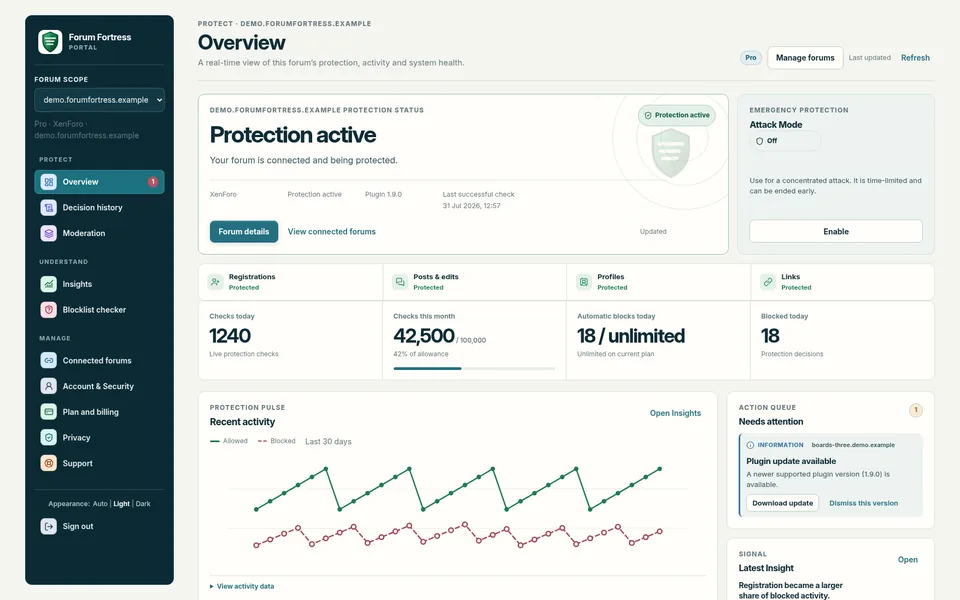
Protection runs through the plugin, with no dashboard to keep open. The portal shows decision history and activity when you need to investigate or manage your forums.
No extra steps for members
Protection without putting members through a test.
Privacy
Personal details are kept briefly.
Raw personal details are held for up to five days, then replaced with one-way hashes for longer-term comparison. Live checks can use the global network or stay within the UK, EU or US.
Read about data handling- Raw personal details kept for up to five days
- One-way hashes after that
- Private messages are never scanned
- No member-facing challenge or script
Plans
Start free. Stay on Forever Free if you like.
No credit card or signup required. Eligible new forums get a 30-day Pro trial; after that, stay on Forever Free or choose Core or Pro.
Get started
Start with your forum’s plugin.
Choose your platform and follow its setup guide. Protection begins after the first connection.
Choose your forumNo credit card or signup required.