
Flarum 1.8 and 2 installation
The same Forum Fortress Composer extension supports both Flarum 1.8 and Flarum 2. Once enabled, it selects the correct administration interface, registers the forum with Forum Fortress and starts checking supported activity.
The current Forum Fortress extension version is 1.4.6.
Forum Fortress returns either ALLOW or BLOCK. An allowed action continues normally; a blocked action is rejected before Flarum completes it.
Optional repeat-spammer suspension
Suspend repeat spammers for seven days in the native extension settings is Off by default, including upgrades from 1.4.4. Install and enable the compatible Flarum Suspend extension to make this control available.
When enabled, two distinct confirmed BLOCKs with original scores strictly above 80 within 24 hours can suspend a confirmed member who joined within seven days and has at most ten comments. Administrators, moderators, custom groups, guests, system accounts, existing suspensions and established members are protected. Registration, outages, policy-only blocks and legacy responses cannot count. The server must explicitly certify each response as eligible for escalation.
The Flarum scheduler must run every minute; the separate
forumfortress:repeat-offenders command processes durable local work. It also
rechecks settings, permissions and evidence before using the native Suspend API.
No extra remote API request is made on submission. Duplicate bodies and stable
decision references count once; replay receipts are retained for seven days.
Reverse a suspension through the normal Flarum Suspend controls. Automatic
suspension applies at most once per member, so a moderator's reversal is retained.
Disabling this setting or Suspend prevents pending actions. Purging Forum
Fortress removes its evidence tables and leaves native suspensions intact.
Spam-clean and account deletion are separate actions and are not enabled here.
Before you start
Make sure you have:
- Flarum
1.8.x, or Flarum2.0.0-rc.5or newer within the Flarum 2 series. The current plugin release is tested on Flarum1.8.20and through Flarum2.0.2. - PHP 8.0 or newer, plus any newer PHP requirement imposed by your Flarum release
- Composer access in the Flarum installation directory
- Flarum administrator access
- outbound HTTPS access from the forum server
Flarum's server requirements do not specify a PHP memory limit. Forum Fortress cache rebuilding is tested at 128 MB on PHP 8.4 and Flarum 2.0.0 with its standard bundled extensions enabled. Additional extensions or custom styles can change memory use, and PHP CLI and web limits may differ.
If your host manages Composer for you, ask it to install the package forumfortress/flarum.
Privacy and outbound access
Forum Fortress sends supported forum activity to its analysis service. Checks can include submitted text, links, IP address, email address, username, account details, and basic request metadata.
If your server uses an outbound firewall, allow HTTPS traffic on port 443 to hosts ending in:
*.ffapi.net
Read Privacy and network access before enabling the extension on a live community.
Install with Composer
Run these commands from the Flarum root, where composer.json and the flarum executable are located:
composer require forumfortress/flarum:"^1.4"
php flarum extension:enable forumfortress-flarum
php flarum cache:clear
The supported Flarum and Guzzle packages are already present in standard Flarum 1.8 and 2 installations. This scoped command installs Forum Fortress without changing their locked versions. Do not add Composer's -W or --with-all-dependencies option.
You can also enable the extension from Administration > Extensions after Composer finishes.
Install from Flarum Extension Manager
Or search in Extension Manager for Forum Fortress - Spam Blocker.
Forum Fortress can also be installed from Flarum's native Extension Manager. This is the recommended route when your host exposes the manager:
- Open Administration > Extensions.
- Choose Find more extensions or Install extension.
- Search for Forum Fortress - Spam Blocker and select the official
forumfortress/flarumpackage from Packagist. - Select Install, wait for Composer to finish, then select Enable.
- Open the Forum Fortress - Spam Blocker administration page and follow First connection.
If the Extension Manager is unavailable on your hosting plan, use the scoped Composer command above instead.
After enabling, use Refresh, Connection test, and Synchronize now from the administration page to confirm that the extension can reach Forum Fortress and has stored its site identity. A temporary bootstrap warning alone does not mean that Flarum failed to install the extension.
First connection
- Open Administration > Extensions > Forum Fortress - Spam Blocker.
- Leave Site API key blank for a new installation. Forum Fortress bootstraps the site automatically.
- Keep Enable Forum Fortress protection enabled.
- Select Refresh to load the current site, plan, endpoint, and usage details.
- Select Connection test and wait for the success message.
- Select Open Forum Fortress to open the portal on this forum. Use Register site in the extension when you want to associate it with an account; this is optional for initial protection.
If details initially say Refresh to view, select Refresh, Connection test, or Synchronize now. These actions retrieve the latest status from the service.
You can install without a portal account. See Your account and forums to connect the forum to an account later.
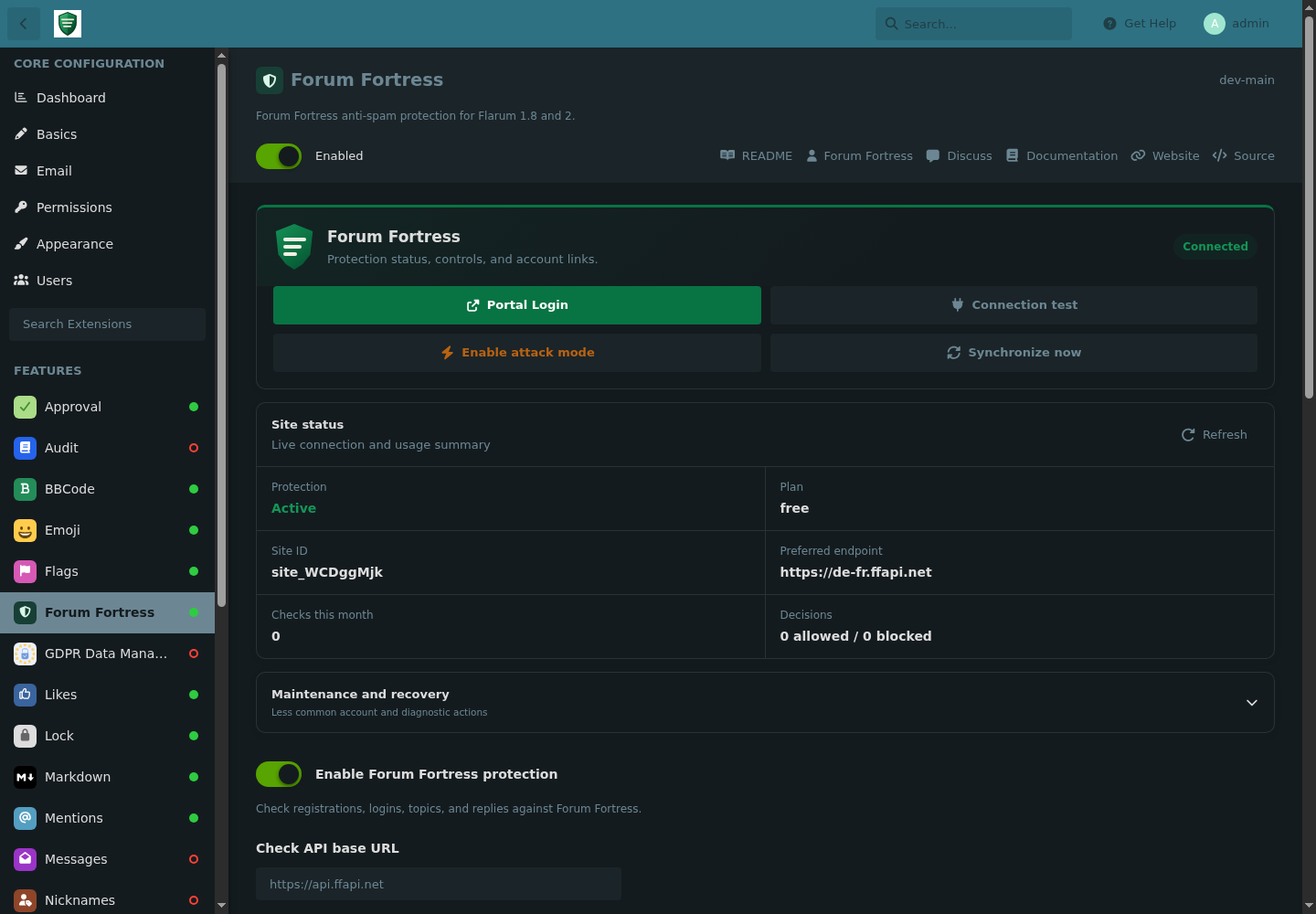
Forum Fortress administration after a successful Flarum connection test.
Recommended settings
| Setting | Recommendation |
|---|---|
| Enable Forum Fortress protection | Enabled |
| Allow requests when Forum Fortress is unavailable | Enabled for most forums, so a service or network interruption does not lock users out |
| Site registration email | Leave blank unless you want to use Register Site from the extension |
| Request timeout | Keep the default unless support asks you to change it |
| API region | Global unless you require UK-, EU-, or US-only check processing |
| Allow global emergency fallback | Disabled when strict regional processing is required |
| Site API key | Leave blank on first use; automatic bootstrap stores the issued key |
Choose an API region
Use Global unless you need regional processing. Select United Kingdom only, European Union only, or United States only to keep live checks and decisions in that regional API service.
Allow global emergency fallback is off by default. If you enable it and the selected regional service remains unavailable after a retry, Forum Fortress may send the check through the global network. Processing may then occur outside the selected region. Leave it disabled when strict regional processing is required.
This setting applies only to live spam checks. Bootstrap, portal access and account management continue through the Forum Fortress control system in the United Kingdom.
Scheduler
Forum Fortress uses Flarum's scheduler for heartbeat, endpoint maintenance, and moderation synchronization. It is strongly recommended (and required for production reliability) to keep Flarum's scheduler running every minute:
* * * * * cd /path/to/flarum && php flarum schedule:run >> /dev/null 2>&1
Replace /path/to/flarum with the directory containing the flarum executable.
Without this cron, synchronization and moderation queue updates can fall behind.
Manual synchronization is also available:
php flarum forumfortress:sync
# After fixing a connection problem, bypass the automatic retry backoff:
php flarum forumfortress:sync --force
php flarum forumfortress:moderation-sync
What is protected
The extension checks the same supported activity on Flarum 1.8 and 2:
- new registrations
- new and edited discussions
- new and edited replies
- supported profile changes, including signatures
The extension does not send login events. This integration does not handle or send Flarum contact forms.
Blocked registrations are rejected before the account is stored. Blocked discussions and replies are rejected before the content is published. Supported moderation actions synchronize with Flarum's normal Approval flow and the Forum Fortress portal.
Updating
From Administration > Extensions, use the Extension Manager's available update for Forum Fortress, review the Composer changes, and clear Flarum's cache if prompted.
From the Flarum root:
composer update forumfortress/flarum
php flarum migrate
php flarum cache:clear
Keep the update scoped to forumfortress/flarum; do not add -W or --with-all-dependencies, which permits Composer to update packages already supplied by Flarum.
Open Forum Fortress in Administration and run Connection test after an update. Then use Refresh and confirm that the extension is enabled, the current site and endpoint are shown, and synchronization is current.
Disabling or removing
To disable the extension but keep it installed:
php flarum extension:disable forumfortress-flarum
php flarum cache:clear
To remove it from the command line, run the native purge first so Forum Fortress can remove the remote forum and apply the account-retention rules:
php flarum migrate:reset --extension=forumfortress-flarum
composer remove forumfortress/flarum
php flarum cache:clear
When using Extension Manager, choose Disconnect and remove site in the Forum Fortress maintenance panel before removal. If the extension is already disabled, re-enable it first because disabled extensions cannot display their maintenance panel or register removal listeners. The current release also handles Extension Manager's removal event when the extension is still loaded. A manual disconnect pauses automatic bootstrap until the extension is explicitly re-enabled or reinstalled.
Do not remove the Composer package first if you still need the Forum Fortress maintenance panel. Removing the package does not remove unrelated Flarum users, discussions, or posts.
Troubleshooting
| Symptom | What to check |
|---|---|
| Composer cannot find the package | Confirm the package name is forumfortress/flarum, then run composer clear-cache and retry. |
| Forum Fortress - Spam Blocker is not found in Extension Manager | Search the exact name Forum Fortress - Spam Blocker, confirm the host allows Composer installs, and use composer require forumfortress/flarum:"^1.4" if the manager is unavailable. |
| Extension Manager installed it but it is not active | Open Administration > Extensions, select Enable, clear the Flarum cache, and reopen the Forum Fortress - Spam Blocker administration page. |
| Extension will not enable | Confirm Flarum is 1.8.x or Flarum 2.0 RC5 or newer, and that PHP meets your Flarum release's requirement. |
| Connection test fails | Check outbound HTTPS, DNS, firewall, WAF, proxy, and host-level egress rules. |
| Status details do not appear | Select Refresh or Synchronize now, then check that the scheduler is running and the extension is enabled. |
| Open Forum Fortress does not open | Allow popups for the Flarum administration page and try again. |
| Legitimate activity is blocked | Review the decision in the portal, then include its decision reference when contacting support. |
| Synchronization is delayed | Confirm Flarum's scheduler runs every minute and try Synchronize now. |
For more help, check the general troubleshooting guide or use Forum Fortress support. Include your forum URL, Flarum version, extension version, approximate time, and any decision reference or error message.
Licence
The extension is free and open-source software under GPL-2.0-or-later. The
hosted service is separate and governed by its service terms. See
Plugin licensing.