
XenForo installation
Forum Fortress provides the stable 1.9.2 XenForo 2 add-on. Install it through the XenForo Admin control panel like any other add-on.
Once enabled, the add-on starts protecting your forum straight away.
Before you start
Make sure you have:
- XenForo 2.3 or newer
- super administrator access
- permission to install add-ons
- outbound HTTPS access from your server to Forum Fortress services
Some hosts block unfamiliar outbound connections by default. If the connection test fails, check hosting firewall, WAF, DNS, and proxy settings.
Privacy and outbound access
Forum Fortress needs outbound HTTPS access to provide spam checks.
If your server uses an outbound firewall, allow HTTPS traffic on port 443 to hosts ending in:
*.ffapi.net
Before enabling the add-on on a live community, you may need to update your forum's privacy policy. Forum Fortress receives forum activity details for spam analysis, including submitted content and user details relevant to each check.
Read Privacy and network access before installing.
Install steps
- Download the latest XenForo ZIP from the Forum Fortress website using Download now.
- In the XenForo Admin control panel, go to Add-ons → Install/upgrade from archive.
- Upload the Forum Fortress ZIP.
- Install and enable the add-on when XenForo prompts you.
- Open the Forum Fortress options and enter your forum's public URL as visitors see it.
- Run Tools → Forum Fortress → Connection test to confirm the forum can reach the service.
- Select Open Forum Fortress in the add-on administration area to open the portal on this forum. Use Complete registration in the add-on when you want to associate it with an account.
See Your account and forums for account linking.
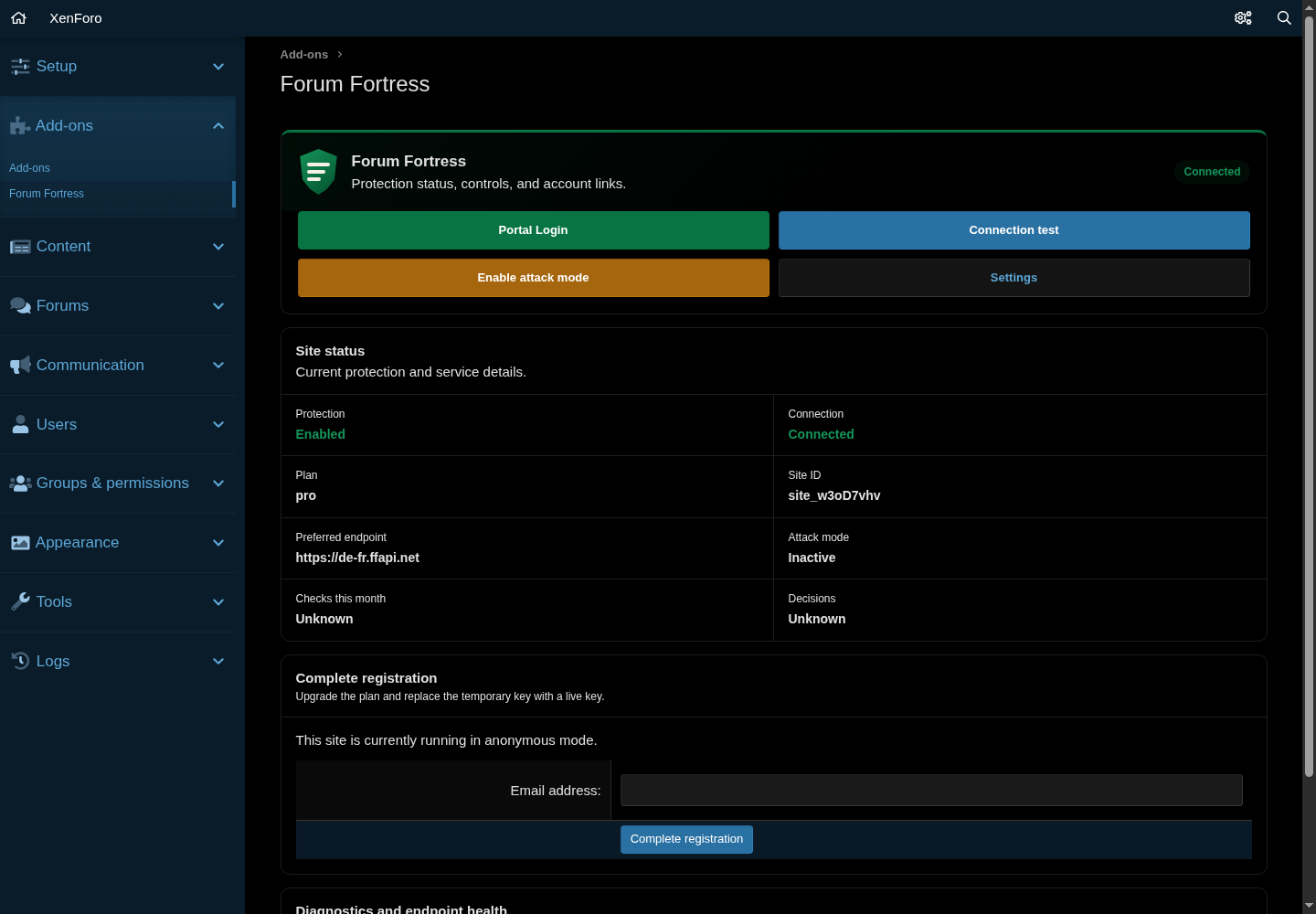
Forum Fortress administration after a successful XenForo connection test.
Choose an API region
Use Global unless you need regional processing. Select United Kingdom only, European Union only, or United States only to keep live checks and decisions in that regional API service.
Allow global emergency fallback is off by default. If you enable it and the selected regional service remains unavailable after a retry, Forum Fortress may send the check through the global network. Processing may then occur outside the selected region. Leave it disabled when strict regional processing is required.
This setting applies only to live spam checks. Bootstrap, portal access and account management continue through the Forum Fortress control system in the United Kingdom.
What happens after install
Forum Fortress begins checking supported actions such as registrations, logins, posts, replies, and profile updates.
Depending on the decision and your settings, an action may be allowed or blocked.
Held items may appear in XenForo's normal moderation flow and, where available, in the Forum Fortress portal.
Optional: Soft Delete Purge
Soft Delete Purge is a separate free add-on for cleaning up old soft-deleted content.
It is not required for Forum Fortress spam protection. Install it only if you want that cleanup feature.
You can download it from the same Download now section of the Forum Fortress website.
Updating the add-on
When a new version is available:
- Download the latest ZIP from forumfortress.com/platforms (same Download now section).
- In XenForo, use Add-ons → Install/upgrade from archive.
- Upload the new ZIP and follow the normal XenForo upgrade flow.
- Run the Forum Fortress connection test afterwards if you want to confirm everything is healthy.
Troubleshooting
| Symptom | What to check |
|---|---|
| Connection test fails | Outbound HTTPS, DNS, firewall, WAF, reverse proxy, or host-level egress rules. |
| HTTP 429 or repeated timeouts | Hosting rate limits, WAF rules, or unusually aggressive security software. |
| Blocked items appear in moderation | Check the add-on settings and XenForo approval queue to confirm how blocked content is configured and handled. |
| Portal does not show the forum | Confirm the forum is connected to the same email/account you are using in the portal. |
| Public URL looks wrong | Update the Forum Fortress options so the forum URL matches what visitors actually use. |
For help:
- Check the FAQ and troubleshooting guide
- Use Contact in the portal for specific issues
Include your forum URL, XenForo version, add-on version, and the approximate time the issue happened.
Licence
The Forum Fortress add-on source is free and open-source software under
GPL-2.0-or-later. The hosted service is separate and governed by its service
terms. See Plugin licensing.