
MyBB installation
On MyBB 1.8.x, Forum Fortress 1.3.1 checks registrations, new threads, replies, post edits, profile and signature changes, and contact-form submissions before MyBB saves or publishes them.
The package contains the installable inc/plugins/forumfortress.php file plus
its licence, notice, changelog and contribution guidance.
Before you start
You need:
- MyBB 1.8.x and PHP compatible with your MyBB installation
- an administrator account with permission to manage plugins and settings
- filesystem, SFTP, SSH, or hosting-panel access to the MyBB installation
- outbound HTTPS access from PHP to Forum Fortress on port 443
- a current backup of the forum files and database before making a production change
The plugin needs PHP’s HTTP client support (normally cURL) and a server clock that is reasonably accurate. If the forum is behind a reverse proxy, make sure MyBB receives a trustworthy visitor IP address.
Privacy and outbound access
Forum Fortress sends information needed to assess an attempted action, including the submitted content, account details relevant to the action, IP address, and user agent. Review Privacy and network access before enabling it on a live community.
If your outbound firewall is restrictive, allow HTTPS traffic to hosts ending in:
*.ffapi.net
Install the plugin
- Download the latest MyBB ZIP from forumfortress.com/platforms.
- Extract the ZIP locally. It contains the plugin, native task and Admin language file under
inc/. - Back up your existing
<mybb>/inc/plugins/forumfortress.phpfile if one exists. - Upload the complete extracted
inc/tree to<mybb>/inc/, preserving its subdirectories. - In the MyBB Admin Control Panel, open Configuration → Plugins.
- Find Forum Fortress and select Install & Activate.
- Open Configuration → Forum Fortress. This is the plugin dashboard; it is separate from MyBB’s raw settings form.
- Select Bootstrap site. This creates or refreshes the Forum Fortress identity for the forum.
- Select Connection test and confirm the displayed API checks succeed.
If bootstrap reports that this site was registered before, use the Forum Fortress portal to open a re-registration window, then bootstrap again. Alternatively enter the supplied API key and site ID in Open Settings.
Configure protection
Use Configuration → Forum Fortress → Open Settings to control:
| Setting | Recommended starting value |
|---|---|
| Enabled | Yes |
| API region | Global unless you require UK-, EU-, or US-only check processing. |
| Allow global emergency fallback | No when strict regional processing is required. |
| Request timeout | 5 seconds |
| Fail open | Yes initially; an API outage will not stop normal community activity. |
| Ban repeat spammers for seven days | No; enable only after reviewing the protections below. |
| Also clean eligible public replies | No; separate opt-in after reviewing the cleanup limits below. |
| Send ham feedback | Yes if you want approved activity to improve feedback signals. |
| API key / Site ID | Managed automatically by bootstrap. Do not share these values. |
The dashboard displays a masked API key, site identity, endpoint state, plan, attack-mode state, and recent decisions.
The API key input is blank. Paste a replacement to rotate it; leaving it blank preserves the stored key. The existing plaintext value is never sent to Admin.
Optional seven-day bans
Ban repeat spammers for seven days defaults Off on installation and upgrade.
When enabled, two distinct confirmed content BLOCKs within 24 hours can trigger
one native seven-day ban. The service must certify each event with boolean
escalation_eligible: true, which requires an original score strictly above 80.
Bodies and stable decision references are deduplicated. Registrations, outages,
policy blocks and older responses without certification never count.
Only ordinary registered members who joined within seven days and have at most ten posts qualify. Guests, system accounts, administrators, moderators, custom groups, established or already suspended members and the wrong author are protected. The separate native task rechecks permissions, settings and evidence. No extra synchronous service requests are added.
Keep Tools & Maintenance → Task Manager → Forum Fortress repeat-spammer bans
enabled. It needs MariaDB transaction-status support (@@in_transaction),
InnoDB evidence tables and a native banned group;
missing dependencies make the control unavailable. Scheduling follows normal
forum traffic, so quiet forums may delay a ban. MySQL servers without that
transaction-status variable leave enforcement unavailable. Ordinary spam
checks continue.
Review attempts in Configuration → Forum Fortress and lift bans in native Users & Groups → Banning. MyBB's cleanup task expires them after seven days. Each member can receive at most one automatic ban, preserving a moderator's reversal. Failed or unconfirmed attempts require native moderator review and are not retried automatically. Accounts and subscriptions remain; this feature never deletes accounts or permanently purges posts.
Optional public-reply cleanup
Also clean eligible public replies is a separate option and defaults Off on
fresh installation and upgrade. With repeat-spammer bans enabled, it requires
three independent repeat_cleanup_eligible: true BLOCKs within 24 hours
(original score at least 80), a member who joined within seven days, and five
posts or fewer. Its evidence is separate from ban-only mode, so switching
modes cannot reuse earlier events. Exactly five posts can qualify; six cannot.
After its own confirmed ban, the native task soft-deletes up to five approved public replies. Thread starters, private or password-protected forums, private messages, profiles, signatures and other authors' content are excluded. Review cleanup status in Configuration → Forum Fortress and restore replies with MyBB's native Deleted Posts controls. A restored reply is not automatically deleted again.
MyBB's native account and content tables may use MyISAM, so they cannot provide a full transaction rollback. Durable per-post receipts are stored before the native soft-delete call. After interruption, still-hidden posts can be marked cleaned; visible posts with ambiguous pending receipts are skipped and need moderator review. The worker does not blindly repeat those deletions.
Cleanup stops when its ban expires or is reversed, permissions change, or the option is switched Off. Disabling or uninstalling does not reverse existing native bans or restore content; use MyBB's moderation controls for that.
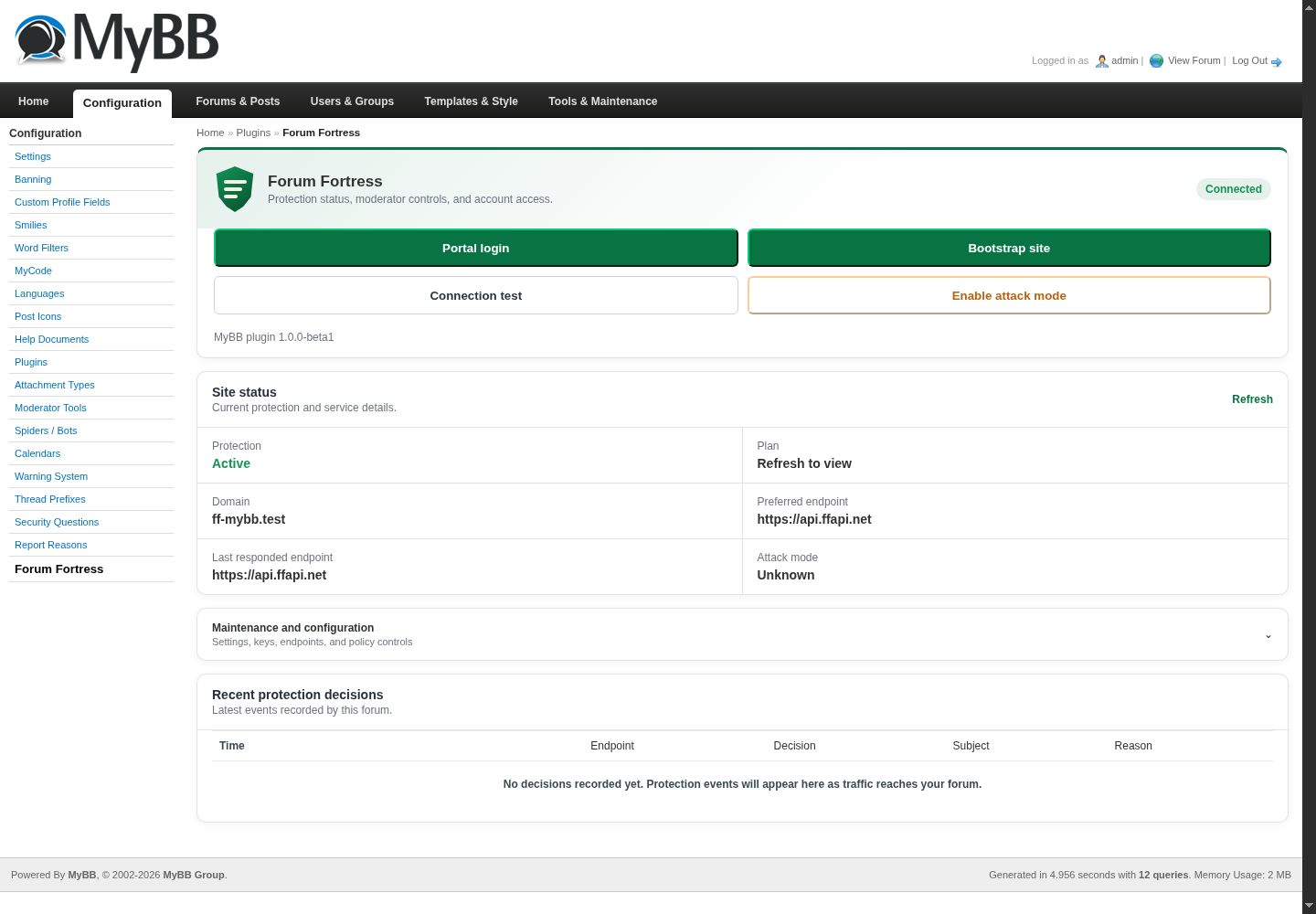
Forum Fortress administration after a successful MyBB connection test.
Choose an API region
Use Global unless you need regional processing. Select United Kingdom only, European Union only, or United States only to keep live checks and decisions in that regional API service.
Allow global emergency fallback is off by default. If you enable it and the selected regional service remains unavailable after a retry, Forum Fortress may send the check through the global network. Processing may then occur outside the selected region. Leave it disabled when strict regional processing is required.
This setting applies only to live spam checks. Bootstrap, portal access and account management continue through the Forum Fortress control system in the United Kingdom.
Use the dashboard
Open Configuration → Forum Fortress for the operational controls:
- Open Forum Fortress opens the portal for the connected site. Use the plugin's registration control if you want to associate the site with an account; this is optional for initial protection.
- Bootstrap site creates or refreshes this forum’s integration identity.
- Connection test checks reachability, API capabilities, and current site status.
- Enable attack mode temporarily applies the service’s stricter anti-spam policy during an active spam wave.
- End attack mode returns to the normal policy.
- Open Settings opens MyBB’s standard setting editor for the plugin.
Attack mode and Open Forum Fortress require a stored API key and site ID. The buttons remain unavailable until bootstrap completes.
What MyBB does with a decision
| Forum Fortress decision | MyBB outcome |
|---|---|
| Allow | The action continues normally. |
| Block | The registration, post, edit, profile change, or contact submission is rejected before it is written. |
| Challenge | Registrations use MyBB’s Awaiting Activation group; content is sent through MyBB’s native moderation path. |
| No response | MyBB allows or blocks according to Fail open. |
Recent checks appear on the Forum Fortress dashboard. Use the portal for account and service controls.
Update the plugin
- Download the new MyBB ZIP.
- In Configuration → Plugins, deactivate Forum Fortress. Do not uninstall it for a normal update; uninstall removes its local settings and audit data.
- Replace all files under
inc/with the matching files from the new archive, including the task and Admin language file. - Return to Configuration → Plugins and activate Forum Fortress.
- Open Configuration → Forum Fortress and run Connection test.
If MyBB serves an old ACP page after an update, refresh without cache or clear the browser cache.
Disable, uninstall, or reinstall
Disable temporarily: select Deactivate in Configuration → Plugins. The file and settings remain in place, but checks stop.
Uninstall completely: select Uninstall. This best-effort deprovisions the remote identity and removes local settings, private credentials, audit/evidence data and the native task/log entries. Native bans and reversal metadata remain. Remove the plugin, task and Admin language files afterwards.
Reinstall: upload the plugin file, select Install & Activate, bootstrap the site if needed, and run a connection test.
Troubleshooting
| Symptom | What to check |
|---|---|
| Plugin is not listed in ACP | Confirm the file is exactly <mybb>/inc/plugins/forumfortress.php, readable by the PHP/web-server user, and has not been uploaded inside an extra directory. |
| Only raw MyBB settings are visible | Use Configuration → Forum Fortress. If the entry is missing, replace the plugin file with the current stable release and reactivate it. |
| Bootstrap or Connection test times out | Check server DNS, PHP cURL, outbound port 443, firewall/WAF rules, proxy configuration, and the selected API region. |
| Portal / attack-mode buttons are disabled | Bootstrap the forum successfully or enter a valid API key and site ID in Open Settings. |
| Legitimate actions are blocked | Check the dashboard decision history and portal, then enable Fail open while investigating if continuity is more important than strict blocking. |
| Changes do not appear after replacing the file | Deactivate and reactivate the plugin, then refresh the ACP without cache. |
For help, include the MyBB version, PHP version, plugin version, forum URL, approximate time of the event, and the connection-test result. Do not include your API key in a support message.
Licence
The plugin is free and open-source software under GPL-2.0-or-later. The
hosted service is separate and governed by its service terms. See
Plugin licensing.