
NodeBB installation
Forum Fortress for NodeBB checks supported registrations, topics, replies, content edits and profile changes before NodeBB saves them. The current stable release is 1.0.1.
Requirements
- NodeBB
4.16.0or later in the NodeBB 4.x series - Node.js 22 or newer, matching NodeBB 4.x requirements
- a NodeBB administrator account
- outbound HTTPS access to
*.ffapi.neton port 443 - shell access only if you use the manual npm method
Install from the NodeBB plugin catalogue
This is the normal installation path for an administrator:
- Sign in to the NodeBB Admin Control Panel (ACP).
- Open Extend → Plugins.
- On Find Plugins, search for Forum Fortress or
nodebb-plugin-forum-fortress. - Select Install on the Forum Fortress result.
- Open the installed/active plugins view and select Activate.
- Use NodeBB's Rebuild & Restart action when prompted.
- After NodeBB returns, open Plugins → Forum Fortress.
The catalogue is supplied by NodeBB's package manager and can take a little time to discover a newly published npm package. If the compatible result is not yet visible, use the manual npm method below rather than installing a similarly named package.
Install manually with npm
Run the commands from the NodeBB installation root: the directory containing
the nodebb executable and NodeBB's package.json.
cd /path/to/nodebb
npm install --save-exact nodebb-plugin-forum-fortress@1.0.1
./nodebb activate nodebb-plugin-forum-fortress
./nodebb build
./nodebb restart
If NodeBB is managed by systemd, Docker or another process manager, use that deployment's normal restart method instead of starting a second NodeBB process.
To confirm the installation from the shell:
./nodebb plugins
Forum Fortress should appear as installed and active.
Connect and verify protection
Open ACP → Plugins → Forum Fortress after NodeBB has restarted.
- Leave Protection enabled selected.
- Choose Global, UK, EU or US routing. Global is the simplest default.
- Leave Fail open enabled unless you deliberately want Forum Fortress outages to reject protected actions.
- Select Save settings.
- Select Connection test. A successful response shows the connected site, endpoint, plan and usage.
- Use Open Forum Fortress when you want decision history, plan controls or account association in the portal.
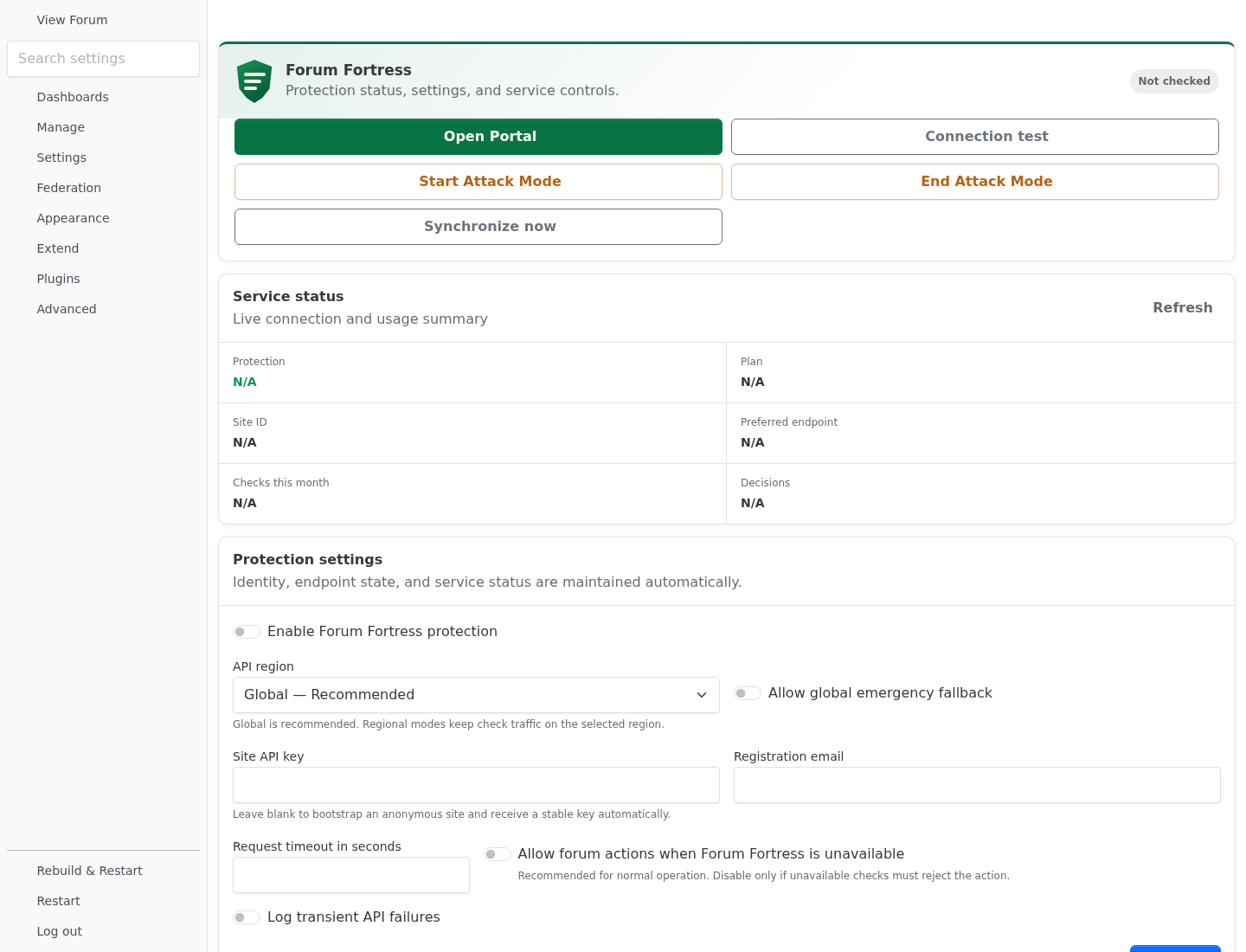
Forum Fortress 1.0.1 in NodeBB 4.16.0 before the first connection test. The site identity and usage fields populate after bootstrap.
The first connection automatically creates an anonymous Forum Fortress site and stores its site ID and API key in NodeBB's server-side settings. You do not need to paste a key or create a portal account before protection starts. Do not post the stored API key in support messages or logs.
What the plugin checks
The 1.0.1 release checks these local actions:
- new HTTP registrations;
- new topics and replies;
- edited topic titles, topic bodies and replies when content changed;
- username, full-name, signature and about-me changes.
Administrator actions and incoming ActivityPub/federated content are skipped.
Private messages, passwords, password hashes, session data, cookies, CSRF
tokens, OAuth tokens and unrelated profile fields are not sent. A review
decision is allowed in this release because NodeBB does not expose a supported
approval-queue bridge that maps cleanly to the Forum Fortress moderation queue.
See Privacy and network access for retention and data handling details.
Update
From the NodeBB root:
npm install --save-exact nodebb-plugin-forum-fortress@latest
./nodebb build
./nodebb restart
Review the displayed version and release notes before updating a production forum. NodeBB may also offer the update from Extend → Plugins when the new release is compatible with your NodeBB version.
Disable or remove
To stop checks without removing the package, disable protection on the Forum Fortress settings page or deactivate the plugin in NodeBB.
If you want to delete the remote Forum Fortress site too, first use Disconnect and remove site on the plugin page. NodeBB does not wait for a plugin's deactivation hook, so ordinary deactivation or npm removal does not delete the remote site automatically.
Then deactivate and remove the local package:
cd /path/to/nodebb
./nodebb reset -p nodebb-plugin-forum-fortress
npm uninstall nodebb-plugin-forum-fortress
./nodebb build
./nodebb restart
Troubleshooting
| Problem | What to check |
|---|---|
| Forum Fortress is not in catalogue results | Search for the exact package name, confirm NodeBB is 4.16 or later, then use the manual npm installation while the catalogue refreshes. |
| Plugin is installed but no menu item appears | Confirm it is active, run ./nodebb build, restart NodeBB and refresh the ACP. |
| Connection test fails | Confirm outbound HTTPS to *.ffapi.net, the selected region and the NodeBB server clock. Enable debug logging temporarily and inspect the NodeBB log; keys are redacted. |
| A protected request pauses during an outage | Keep fail-open enabled for availability, or adjust the request timeout on the plugin page. |
| Reinstall cannot reconnect an existing domain | In the Forum Fortress portal, open that forum and use Reset key, then retry within the displayed ten-minute window. |
If NodeBB becomes unavailable after activating any plugin, its documented
recovery command is ./nodebb reset -p nodebb-plugin-forum-fortress. For more
help, use the general troubleshooting guide or
Forum Fortress support. Include the forum
URL, NodeBB version, plugin version, approximate time and sanitized error text.